> ## Documentation Index
> Fetch the complete documentation index at: https://docs.talview.com/llms.txt
> Use this file to discover all available pages before exploring further.
# July 2026 Release Updates
The July 2026 release delivers enhancements across **Workflow Tools, Interview Rooms, Proctoring, Assessment Engine & Candidate Experience, and Admin**, introducing improved candidate visibility across workflows, expanded session review tools, new Form Builder capabilities, and platform reliability improvements.
***
### Workflow Tools Enhancements
This month, we introduced enhancements focused on **improved candidate visibility across workflows and Ivy Call transcription**.
#### 🆕 Feature
1️⃣ **"All" View Candidate Side Panel**
**Description:** Recruiters can now view a candidate's entire workflow journey across Screening, Assessment, and Interview in a single unified side panel from the All tab.
**What's New**
* Consolidated candidate header, Resume Fitment sub-card, and step-wise accordion cards with per-step states.
* Activity timeline showing full candidate history in one vertical feed.
* Sticky footer with Schedule and Invite actions available directly from the All view.
* Grouped column headers and per-step filter grouping on the candidate table.
2️⃣ **Ivy Call Transcription in Call History**
**Description:** Recruiters can now read a full transcript of Ivy AI calls directly from the Call History tab, alongside existing audio playback.
**What's New**
* Transcript link on the call history card, shown only when transcript data is available.
* Transcript modal displaying conversation segments in chronological order.
***
#### 🐞 Bug Fixes
**Workflow Tools: Platform Stability**
* Search and filters not functioning across All, Screening, and Assessment tabs.
* Resume Fitment, Score, and Proctoring column display errors.
* Schedule validation gaps and overlapping interview slot conflicts not flagged.
* Resume upload issues in the Invite Candidate flow and bulk uploads.
* Recruiter Dashboard and Inbox stuck on blank or loading state.
* Password reset emails not containing a working link.
**Scheduler: Payment, Booking & Notification**
* Payment issues including incorrect tax deduction and duplicate rescheduling fees.
* Resume parsing reliability issues including slow parsing and bulk upload failures.
* Candidates not receiving assessment invite and slot confirmation emails.
* Stale OTPs and Microsoft Teams redirection failures.
***
### Proctoring Updates
This month, we introduced enhancements focused on **expanded session review capabilities, proctor visibility, and coordinator tools**.
#### Proctor/Center Management (V8)
#### ⚙️ Enhancements
1️⃣ **Session Timeline in Session Summary Report**
**Description:** The session summary report now includes a session timeline showing session start and end times upfront, with a "View full timeline" link to expand and view all key events in between.
**What's New**
* Key events include pauses, extensions, suspensions, disconnections, and more.
2️⃣ **Proctor Lead Session Entry**
**Description:** Proctor leads can now join their active slots directly from their sessions screen.
**What's New**
* Clicking Join Now takes the proctor lead straight into the candidate list view for that slot to begin managing proctor allocation and overseeing candidates.
***
#### 🐞 Bug Fixes
* Candidates joining from a secondary device appeared as two separate tiles in the monitoring grid.
* Switch/Replace button incorrectly appearing on the Secondary Feed tile.
* Inconsistent feed layout across candidate tiles depending on the order participants joined.
* Activity Playback clipped and not fully visible from the candidate monitoring view.
* Broadcast Chat not resetting when switching from Grid View to Individual Candidate view.
***
#### Coordinator Console (V8)
#### 🆕 Features
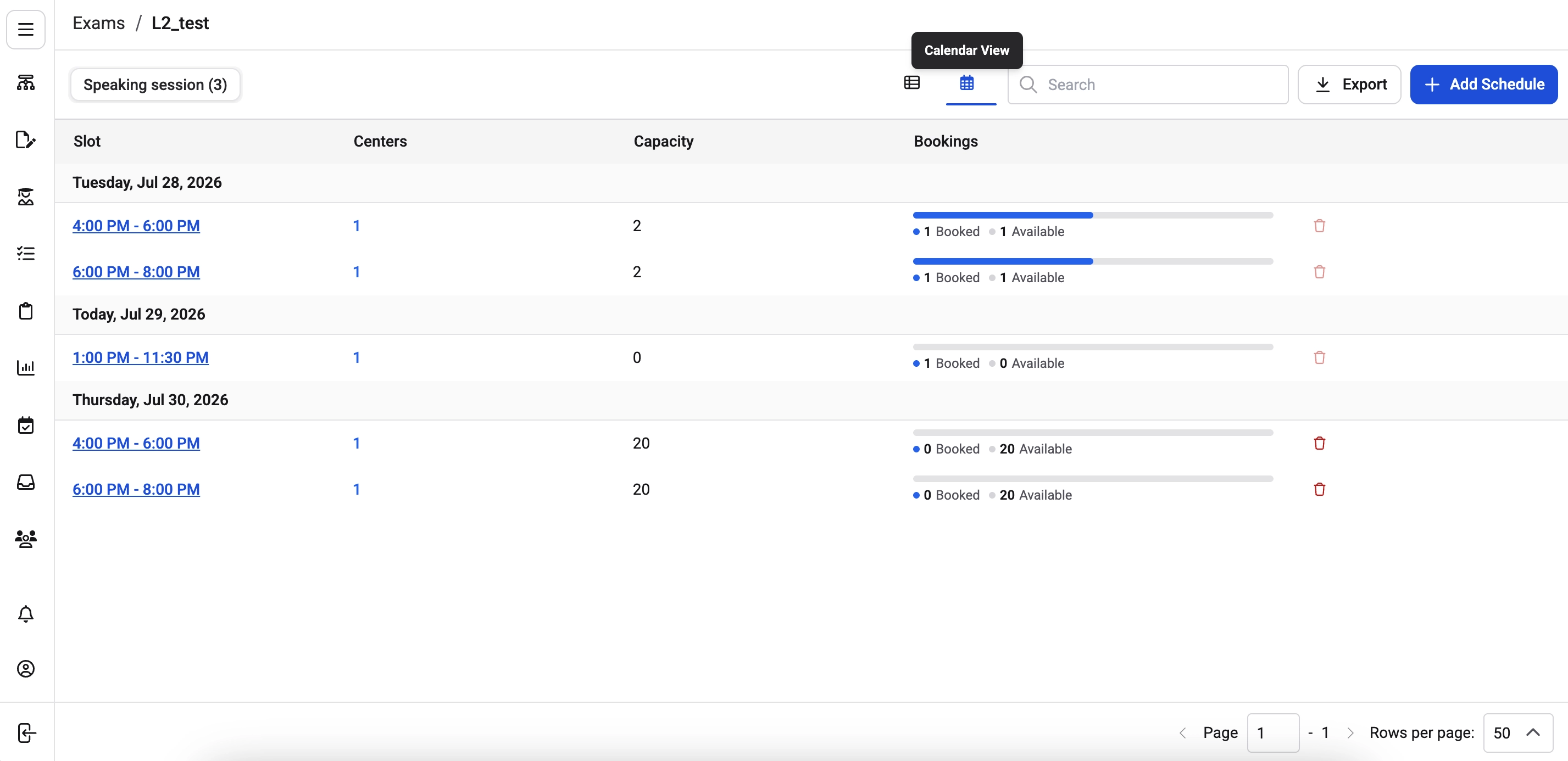
1️⃣ **Calendar View in Assessment Tab**
**Description:** Coordinators can now switch between a candidate view and a calendar view within a fixed slot assessment step tab.
**What's New**
* The calendar view shows scheduled slots grouped by date with capacity and booking information.
* Coordinators can add or delete schedule slots directly from the same tab.
* Only available for steps configured with drive schedule.
 ***
#### ⚙️ Enhancements
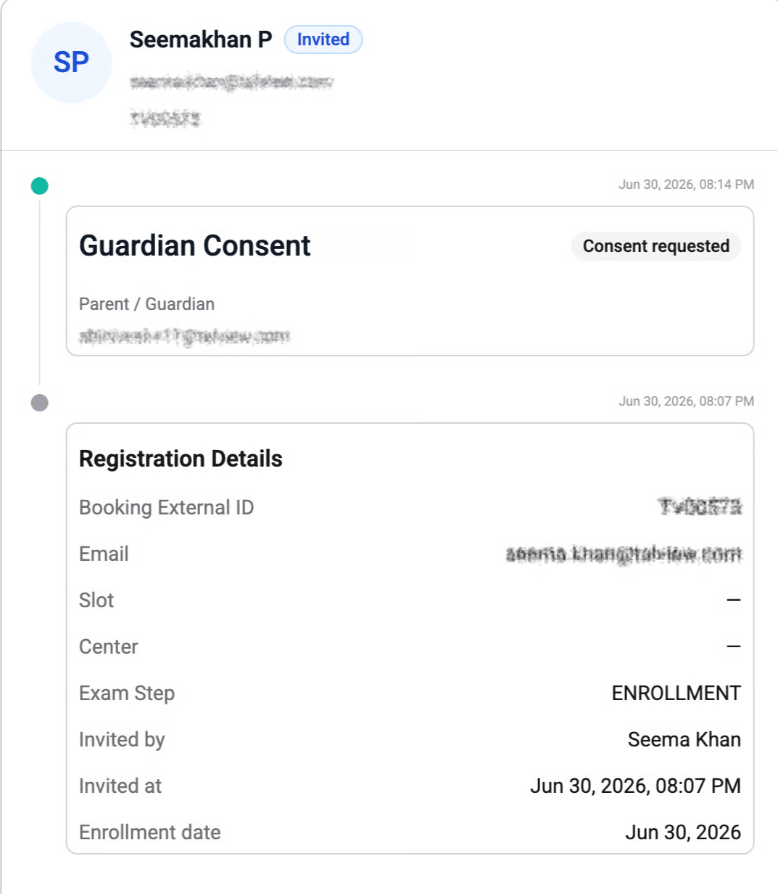
1️⃣ **Guardian Consent Status in Candidate Profile**
**Description:** Coordinators can now see the guardian consent status directly within a candidate's profile.
**What's New**
* A Guardian Consent event appears in the candidate's timeline showing consent status, guardian's email address, and timestamp of when the request was sent.
***
#### ⚙️ Enhancements
1️⃣ **Guardian Consent Status in Candidate Profile**
**Description:** Coordinators can now see the guardian consent status directly within a candidate's profile.
**What's New**
* A Guardian Consent event appears in the candidate's timeline showing consent status, guardian's email address, and timestamp of when the request was sent.
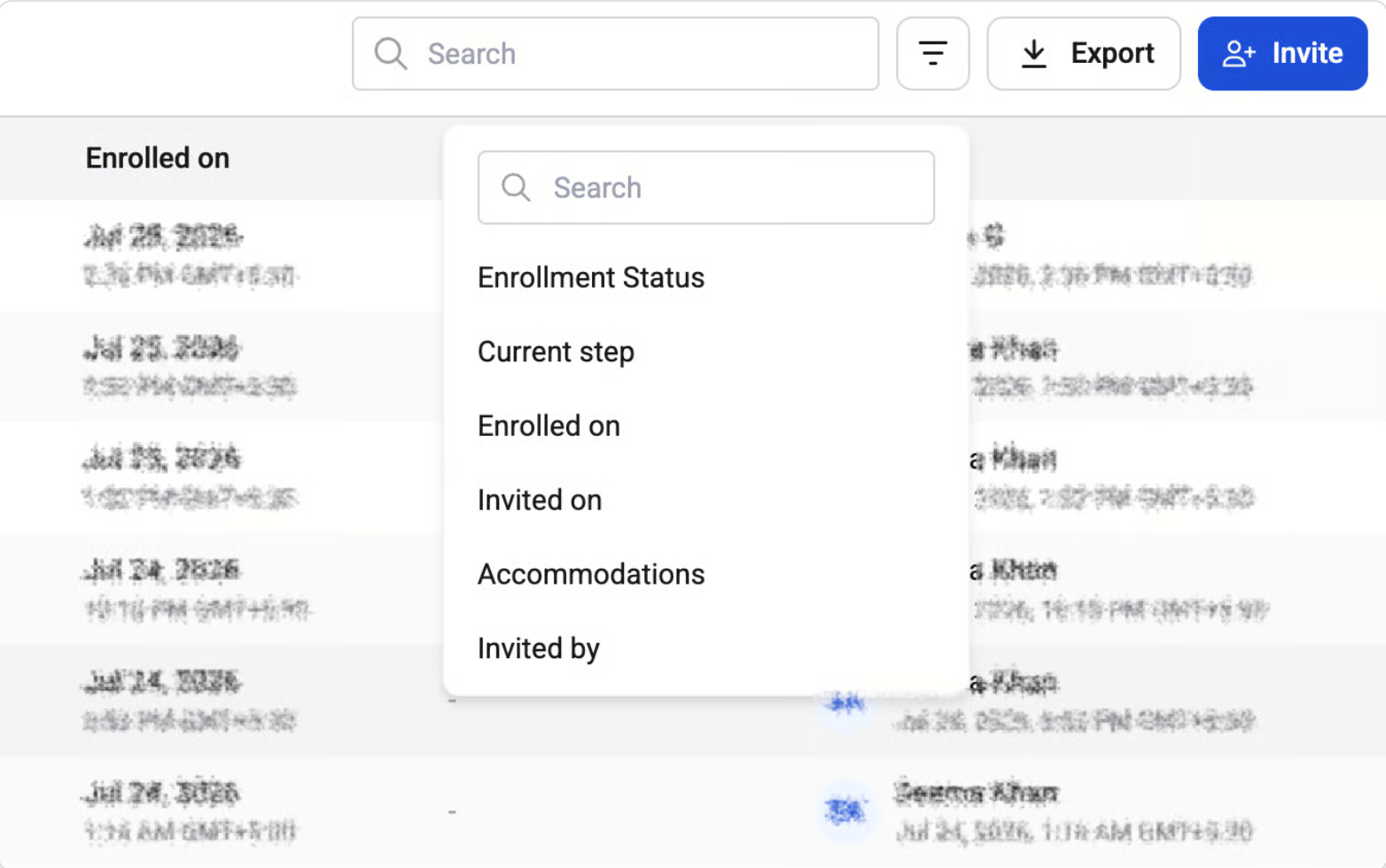
 2️⃣ **Filters and Search in Enrollment List**
**Description:** Coordinators can now search and filter the enrollment list view to quickly find specific candidates.
**What's New**
* Search by name, email, or external ID.
* Filters available across enrollment status, current step, payment status, exam center, accommodations, invited by, and date ranges.
2️⃣ **Filters and Search in Enrollment List**
**Description:** Coordinators can now search and filter the enrollment list view to quickly find specific candidates.
**What's New**
* Search by name, email, or external ID.
* Filters available across enrollment status, current step, payment status, exam center, accommodations, invited by, and date ranges.
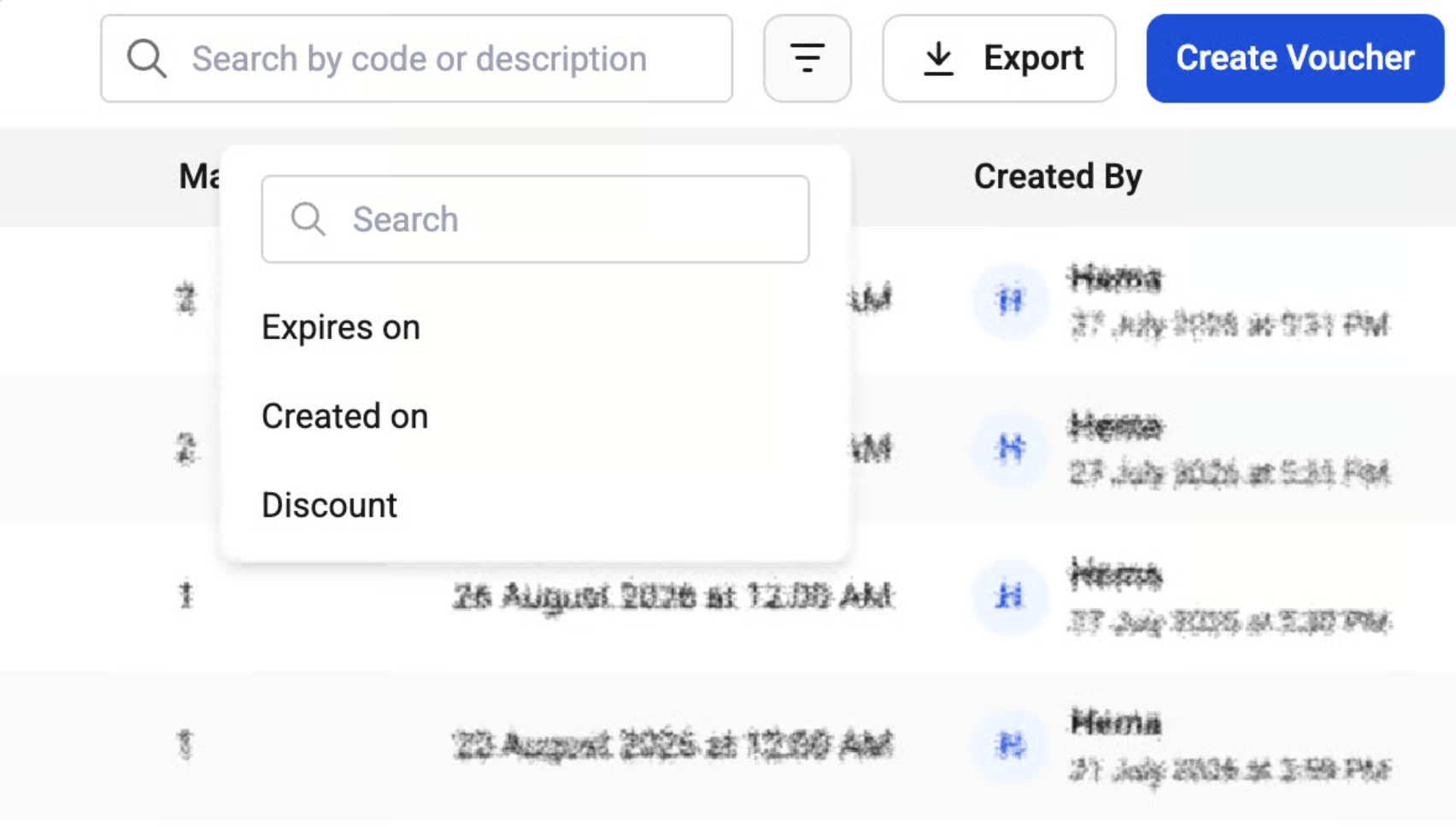
 3️⃣ **Filters in Voucher Management**
**Description:** Coordinators can now search and filter the voucher management view to quickly locate specific vouchers.
**What's New**
* Filters available for discount value, expiry date, and creation date.
3️⃣ **Filters in Voucher Management**
**Description:** Coordinators can now search and filter the voucher management view to quickly locate specific vouchers.
**What's New**
* Filters available for discount value, expiry date, and creation date.
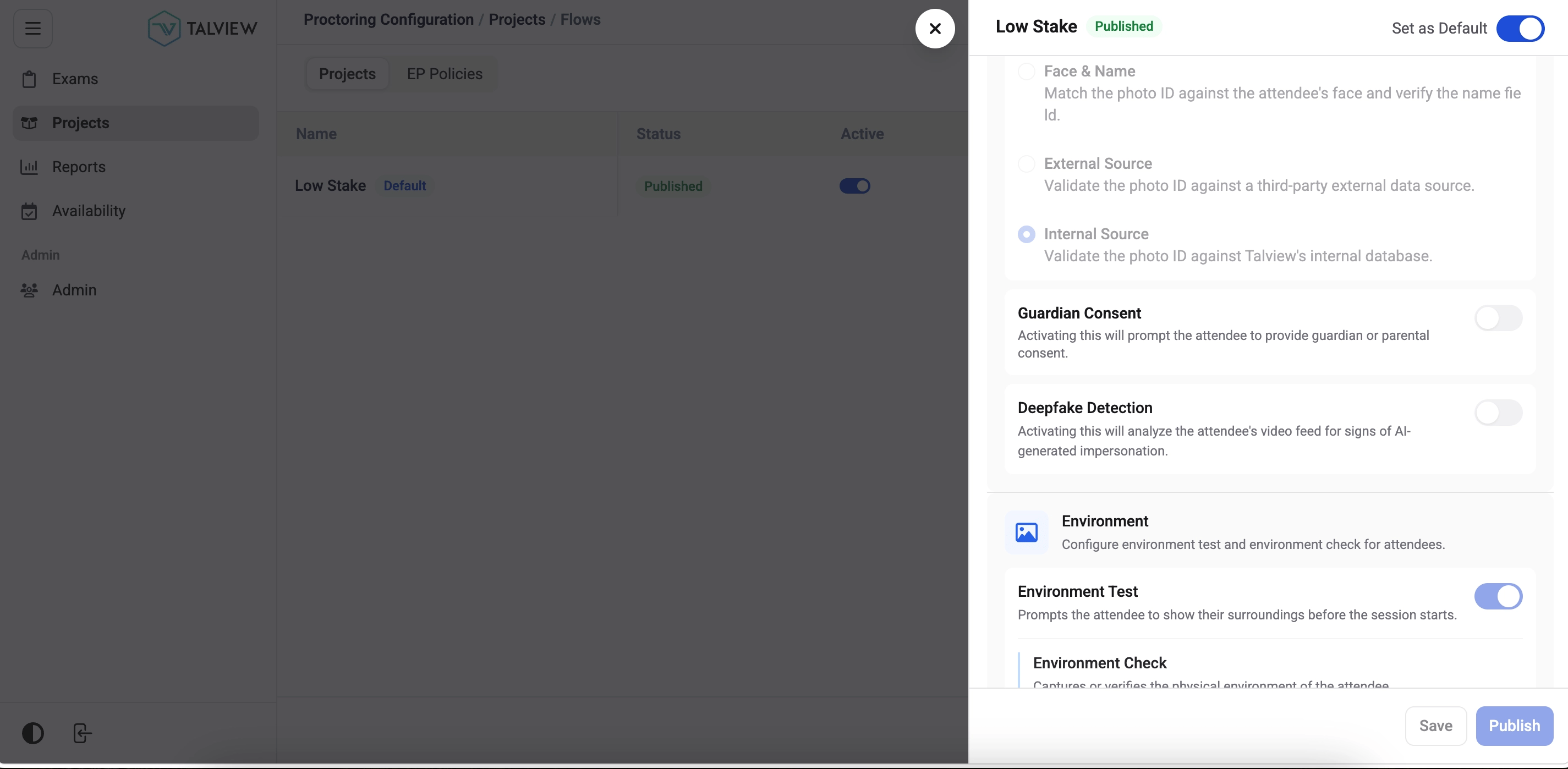
 4️⃣ **Deepfake Detection Configuration in Flow Config**
**Description:** Coordinators can now enable deepfake detection when creating or updating an onboarding flow.
**What's New**
* When enabled, deepfake detection runs automatically during the face capture step of the candidate's onboarding.
4️⃣ **Deepfake Detection Configuration in Flow Config**
**Description:** Coordinators can now enable deepfake detection when creating or updating an onboarding flow.
**What's New**
* When enabled, deepfake detection runs automatically during the face capture step of the candidate's onboarding.
 ***
### Interview Rooms Enhancements
This month, we introduced enhancements focused on **improved session reliability and transcription accuracy**.
#### 🆕 Features
1️⃣ **Auto Screen Share Conflict Resolution**
***
### Interview Rooms Enhancements
This month, we introduced enhancements focused on **improved session reliability and transcription accuracy**.
#### 🆕 Features
1️⃣ **Auto Screen Share Conflict Resolution**
When a new participant starts sharing their screen, the previous participant's share now stops automatically.
2️⃣ **Insights Workflow Stability**
Resolved timeout failures in the insights workflow at the candidate performance save step.
3️⃣ **Soniox Transcription Accuracy**
Improved transcript accuracy for sessions with non-English speech.
***
### Assessment Engine & Candidate Experience Updates
This month, we focused on **improving assessment reliability and candidate experience accuracy**.
#### 🐞 Bug Fixes
* Assessment duration mismatch between the Library overview page and actual configuration.
* Longform section timer starting with less time than configured.
* Published persona changes not reflecting on the dashboard immediately.
* Broken, oversized, or incorrectly oriented question images.
* Browser back button allowing candidates to re-open a submitted assessment.
***
### Admin (Forms) Updates
This month, we introduced enhancements focused on **new Form Builder capabilities across list management, response handling, and version control**.
#### 🆕 Features
1️⃣ **Forms List**
**Description:** A dedicated forms list is now available with navigation, search, and filter support.
**What's New**
* View all forms in a table with search and filter options.
* Navigate directly to any form from the list.
2️⃣ **Form Responses**
**Description:** Candidate form responses can now be viewed and managed directly from the platform.
**What's New**
* Search, filter, sort, and paginate through responses.
* View individual responses in detail.
* Download a form response as a PDF.
3️⃣ **Version History**
**Description:** Form editors can now view, preview, and restore previous versions of a form.
**What's New**
* Access full version history for any form.
* Preview and restore earlier versions as needed.
4️⃣ **New Form Creation**
**Description:** Users can now create a new form from scratch directly within the platform.
***
#### **⚙️ Enhancements**
1️⃣ **Inline Form Title Renaming**
Form titles can now be renamed inline with duplicate-name validation to prevent conflicts.
***
#### 🐞 Bug Fixes
* Form data not retrieved when duplicating a form.
* Form renaming not working correctly.
* Duplicated forms not appearing without a page refresh.
* Search bar not functioning in the forms list.
* Avatar image not displaying correctly.
* Number values stored as strings not rendering correctly.
* Radio button highlighting entire field instead of selected option.
***